Table Of Contents
- What Are the Two Main Types of Orders?
- What Are the Most Common Order Types?
- What Are Exits and Attachments in Trading?
- What Are Combo Orders and Advanced Orders?
- What Are Some Less Common Specialized Orders?
- What Are Time-in-Force Instructions?
- What Are Some Practical Usage Scenarios for Order Types?
- What Are the Most Used Orders?
- What Are Some Common Mistakes Traders Make?
- Conclusion
What Do Market Orders and Pending Orders Mean?
Market & Pending Orders are the foundation of how trades get executed, and knowing when to use each one can make a major difference in your results. While every order tells your broker to buy or sell, the way you place it affects your timing, price control, and risk management.
In this article, you’ll learn the difference between market orders and pending orders, when each type makes sense, and how tools like stop-losses (SL) and take-profits (TP) help you trade with more discipline and precision.
Trading revolves around two main order types: market orders for instant execution and pending orders that trigger once a defined price level is reached
Market orders are all about speed, useful for scalping or reacting to breaking news, but they carry the risk of slippage in volatile conditions
Pending orders provide precision, with tools like buy limits, sell limits, buy stops, and sell stops, helping traders plan ahead and target exact entry levels
Exits are as important as entries, with stop-losses protecting against downside, take-profits securing gains, and trailing stops locking in profits dynamically
Advanced combo orders, such as OCO, OTO, bracket, and If-done combine entries and exits to automate trades and reduce the need for constant monitoring
Specialized orders like iceberg, all-or-none, and market-on-close cater to specific strategies where liquidity management, discretion, or timing is critical
Time-in-force instructions, such as day, GTC, GTD, IOC, and FOK, define how long an order remains active and help traders align orders with their strategies
Common mistakes include forgetting protective stops, mixing up stop and limit orders, and overusing market orders during volatile events, all of which can lead to costly errors
What Are the Two Main Types of Orders?
The two main types of orders are market orders and pending orders. A market order executes immediately at the best available price, while a pending order is set to trigger only when specific conditions are met. This distinction helps traders balance execution speed with price control.
In fast-moving sessions, especially around major economic releases, we regularly see even highly liquid pairs fill a few pips away from the quoted price, which is why market orders need tighter planning than many new traders expect.
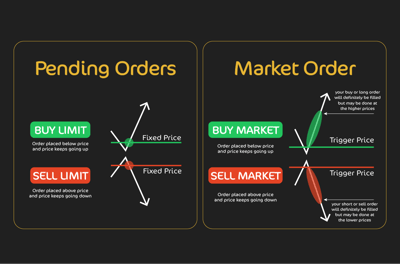
Pending orders are different. Rather than jumping in right now, you are basically instructing the platform to wait until the price reaches a level of your choosing. It could be below the current market, above it, or even set to trigger only under very specific conditions. Pending orders add precision, letting you define your order in advance rather than react in the moment.
Most traders bounce between these two order types depending on their style and strategy. A scalper who wants to go for a fast-moving setup might favor market orders for speed, while a swing trader looking to buy on a dip or sell into strength will be more interested in pending orders.
The key thing you need to know is that both types exist to serve different needs. In the following sections, I will go into greater detail about each type of order.
Across the trading platforms we review most often, pending orders are typically the better fit for traders who want entries planned in advance, particularly when they are working around defined support, resistance, or breakout levels rather than reacting live.
What Are the Most Common Order Types?
The most common order types include market orders, pending orders, and the main variations traders use to enter or exit positions. Each one works differently depending on whether the priority is speed, price, or risk control.
Market Order
As I’ve said, this type of order instructs your broker to buy or sell immediately at the best available price. In my experience, it’s the simplest way to get into a trade, and for many beginners, it’s the first order they ever place.
The main advantage is that execution is guaranteed. So, if you click buy, you’ll be in the market right away, no waiting, no conditions attached.
Trade-off: Less price control.
In calm markets, this order type usually fills close to the quoted price
In fast-moving markets, slippage can occur, meaning that you might pay more or sell for less than expected. This is especially common during major economic releases when prices can jump several pips in seconds.
The effect is minimal in highly liquid pairs like EUR/USD but noticeable in volatile conditions
Best use cases.
When speed matters more than precision.
Lets you participate instantly, but requires careful risk management.
Traders should pair market orders with stop-losses and learn when to use pending orders instead.

Pending Orders (MT4/MT5 standard set)
In my opinion, pending orders let you prepare your trades in advance, telling the platform exactly where you want to enter.
There are intricacies to each order, which I’ll discuss below:
Buy limit
A buy limit order starts below the current market price. You use it to catch dips in an uptrend. For example, if EUR/USD is trading at 1.0800 and you expect it to retrace to 1.0750 before heading higher, putting a buy limit at 1.0750 allows you to get the entry you planned without watching the screen continually.
Sell limit
The sell limit works in the opposite way. You place it above the current price which makes it so useful for shorting rallies in a downtrend. If GBP/USD is sliding but you think it will touch a higher level before falling again, a sell limit lets you time the bounce accurately.
Buy stop
A buy stop sits above the current market price. It’s designed to catch upward momentum, triggering only if the market breaks higher. Traders often use it to ride a breakout through resistance.
Sell stop
The sell stop lies below the market, ready to trigger on a breakdown. If the support level fades, the order activates automatically, letting you catch the downside move without delay.
Buy/sell stop limit
This hybrid order blends the two concepts. The stop triggers the order, but instead of executing at market, it becomes a limit order. It’s a popular tool for breakout traders who still want control over slippage during volatile spikes.
Stay in Control of Your Investments
Build and manage your own portfolio with ease.
Track profits, dividends, gainers, and losers in real time.
Create a custom watchlist for the assets you care about most.
Get live updates on stocks, ETFs, cryptos, and commodities.
Access everything anytime through a sleek, flexible dashboard.
.webp)
What Are Exits and Attachments in Trading?
Exits and attachments are tools that help traders manage how they leave a position after entering it. They are used to pair entries with protective tools and profit targets so the trade is not left to chance. This makes trade management more structured and disciplined.
Stop-loss
An SL is the safety net. It closes your position automatically once the price hits a level you’ve defined, putting a natural limit on how much you can lose. If you’re long EUR/USD at 1.0800 and set a SL at 1.0750, you know your maximum risk is 50 pips. Without this tool, one bad move can wipe out days of progress.
Take-profit
A TP does the opposite. It closes your position at a target of your choosing, locking in gains before the market can turn bad for you. For example, a buy at 1.0800 with a TP at 1.0850 secures 50 pips automatically once that level is reached. It’s the easiest way to make sure you don’t lose your results.
Trailing stop
A trailing stop continues with the concept of the SL. Instead of staying fixed, it moves with the market when the price moves in your favor. If you buy at 1.0800 and trail the stop by 30 pips, once price reaches 1.0830 your stop immediately shifts to 1.0800, turning risk into a break-even position. If price keeps rising, the stop follows, letting you ride the trend while protecting profits.
What Are Combo Orders and Advanced Orders?
Combo orders and advanced orders bundle entries and exits together in one setup. They are designed to give traders more control and reduce the need for constant monitoring. This can make execution more efficient when managing active positions.
The names of combo orders might vary by platform, but the logic is the same: you’re setting conditions not just for entry, but also for what happens next.
Trailing stop order
A trailing stop order is often used as an advanced order wrapper, helping automate trade management as price moves in your favor. Unlike a fixed SL, this one adjusts dynamically, ensuring gains are locked in without cutting your trade short too early.
One-cancels-the-other (OCO)
An OCO order places two instructions at once. Here’s an example: imagine a buy stop above resistance and a sell stop below support. If one gets filled, the other is canceled automatically. It’s an essential tool for breakout traders who watch support and resistance levels closely who want to be ready for either direction without risking double exposure.
One-triggers-other (OTO)
With an OTO order, one instruction only activates after another is executed. For instance, entering long on EUR/USD can trigger a second order to sell later at a predefined level. This allows you to go about sequencing your trades so one action leads naturally into the next.

Bracket order
A bracket order packages everything together. You place an entry, and the system automatically attaches both a SL and a TP. This is the type of “set and forget” style that keeps the risks defined while giving profits a clear target.
If done (IFD)
An IFD order works sort of the same. The main order goes in first, and only if it’s executed does the secondary instruction kick in. It’s another way to automate your follow-ups without leaving positions unprotected.
What Are Some Less Common Specialized Orders?
Some brokers and platforms offer specialized orders beyond standard market orders and pending orders. These tools are less common, but they can give traders more control in specific situations. Their usefulness depends on the platform and the strategy being used.
These are less common in retail trading but can be useful for specific strategies, especially when precision or discretion is key.
Iceberg order
An iceberg order hides the true size of a trade by splitting a large position into smaller visible parts. Only a fraction shows on the order book at any time, keeping market impact low and preventing other traders from spotting the full intent.
All-or-none (AON)
An AON order will only execute if the entire order can be filled at once. Traders use this when partial fills would undermine their strategy, though the risk is that the order may never be executed if liquidity is thin.
Market-on-close (MOC)
A MOC order is designed to execute at the closing price of the day, whatever that may be. It’s often used by traders or funds that want to ensure their position matches end-of-day valuations.
Limit-on-close (LOC)
A LOC order works similarly, but with a price condition attached. It executes at the close only if the price is at or better than the limit you’ve set, giving more control than a pure MOC order.
Stop-on-quote / Limit-on-quote
These orders are triggered by the bid/ask quotes rather than the last traded price. They offer tighter control in fast-moving markets, making sure that your order responds directly to the quoted spreads instead of waiting for a trade print.
What Are Time-in-Force Instructions?
Traders should know that every order needs instructions for what happens when it expires. This means telling the broker how long the order should remain active.
This particular instruction is known as a time-in-force instruction. Choosing the right instruction ensures your orders behave exactly as you plan, whether you want them to sit in the market for days or disappear if not executed instantly.
Day
A day order is valid only for the current trading session. If it hasn’t been filled by the close, it automatically expires.
Good-’til-cancelled (GTC)
A GTC order remains active until you manually cancel it. Traders often use this for swing setups where the entry may take days or weeks to materialize.
Good-’til-date (GTD)
With GTD, you specify a date and time for the order to expire. It gives more flexibility than a day order but still keeps a natural endpoint.
Immediate or cancel (IOC)
An IOC order must be filled immediately. If the full amount isn’t available, whatever can be filled is executed, and the remainder is canceled on the spot.
Fill or kill (FOK)
An FOK order takes the IOC idea further; it must be filled in its entirety immediately, or the whole order is canceled. This instruction is typically used when a trader needs immediate full execution, with no residual order left in the market.
What Are Some Practical Usage Scenarios for Order Types?
In my view, trading isn’t just about knowing order types; it's about knowing when to use them. Different orders give you the flexibility to match execution with strategy and keep risk under control. Use the following points as a “cheat sheet” to understand how the main types of orders work.
Market orders, speed first:
Best when instant execution is critical
Common in scalping, or catching a few pips quickly. Also, in surprise data releases or reacting in seconds to price moves
Pending orders, patience, and precision:
Useful when waiting for a specific setup
Examples: a swing trader sets a buy limit below the current price to catch a pullback. A breakout trader uses a buy stop above resistance to confirm momentum
Risk management is always part of the picture. A market or pending entry is rarely left unmanaged. Most traders attach a SL and TP from the start. This way, the maximum loss and potential reward are known in advance, and you don’t need to constantly watch the screen. Trailing stops add another layer, locking in gains if the market runs further than expected.
How trading styles use orders:
Scalpers rely on market orders and tight stops, while prioritizing speed
Swing traders prefer pending orders and let the market come to them.
Breakout traders often combine buy/sell stops with bracket orders, executing entry, stop-loss, and take-profit together
What Are the Most Used Orders?
The most used orders are usually market orders, limit orders, and common protective orders used for exits. Although brokers may offer many alternatives, most traders rely on a small core set for everyday execution. These tend to cover the main needs of speed, pricing, and risk management.
Market orders are the workhorse, used when speed matters and traders want in or out immediately. Limit orders are next in line, giving traders the precision to buy at or below the current market price or sell at or above it.
Stop orders, whether buy stops or sell stops, are also heavily used for breakout strategies or to trigger trades once the market shows momentum.
Stop-limit orders add a layer of control by turning a stop trigger into a limit entry, reducing slippage risk during volatile moves. Trailing stops are popular with both retail and professional traders because they protect profits while letting winning trades run.
Together, these five order types: market, limit, stop, stop-limit, and trailing stop are the backbone of most trading strategies. The more exotic instructions have their place, to be sure, but these are the ones you’ll see used day in and day out across FOREX, stocks, and futures markets.
What Are Some Common Mistakes Traders Make?
I've been there before. Even experienced traders can trip up when it comes to order placement. Mistakes in trading can cost money and strip away your confidence in yourself as a trader. The good news is that with practice and planning, you can avoid them. But first, you need to know what the most common errors are:
Forgetting SL or TP
Leaves trades unprotected
A sudden move can wipe out gains or magnify losses beyond plan
Mixing up stop and limit orders
Buy stop should be above the current price
The buy limit should be below the current price
Misplacement can trigger unintended trades
The same risk applies to sell orders, potentially flipping a strategy on its head
Overusing market orders in volatility
Market orders guarantee execution, not price
During news events or rapid swings, slippage can be severe
What looks like a smart entry can quickly become costly
Sometimes it’s better to step back and use pending orders instead
Conclusion
Market & Pending Orders give traders two different ways to enter the market: one focuses on immediate execution, while the other emphasizes planning and precision. Understanding how these order types work, and when to use them, can help you improve your timing, manage risk more effectively, and trade with greater confidence.As you continue building your trading approach, focus on choosing the order type that fits your strategy rather than reacting emotionally in the moment. The more deliberately you use your orders, the more control you’ll have over your decisions and results.
FAQ
What is the difference between a market order and a pending order?
A market order executes immediately at the best available price. A pending order stays inactive until price reaches the level or condition you set in advance.
Why do traders use pending orders instead of market orders?
Pending orders help traders plan ahead and avoid impulsive entries. They are useful when you want precision, such as buying a pullback, selling a rally, or trading a breakout only after confirmation.
What’s the main risk of using market orders?
The main risk is slippage. In fast or volatile markets, your trade may be filled at a worse price than expected, which can affect both your entry quality and risk-reward ratio.
How do stop-loss and take-profit orders work?
A stop-loss closes a trade automatically to limit losses if price moves against you. A take-profit closes it at your chosen target so gains are secured without needing constant monitoring.
What is a trailing stop?
A trailing stop is a stop-loss that moves with price when the trade goes in your favor. It helps protect open profit while still leaving room for the trend to continue.
What’s the difference between a buy limit and a buy stop?
A buy limit is placed below the current price to catch a pullback. A buy stop is placed above the current price to enter only if upward momentum or a breakout appears.
Which order types are most commonly used by retail traders?
The core set includes market orders, limit orders, stop orders, stop-limit orders, and trailing stops. These cover most trading needs.
What are some common mistakes traders make with orders?
Forgetting to attach stop-loss or take-profit levels, confusing stop and limit instructions, and overusing market orders during volatile conditions.
What is a sell limit and when is it used?
A sell limit is placed above the current market price. Traders use it when they expect price to rise into a resistance area before turning lower again.
What is a sell stop and when is it used?
A sell stop is placed below the current market price. It is commonly used to trade a breakdown when support fails and the trader wants the platform to trigger the entry automatically.
What is a stop-limit order?
A stop-limit order uses a stop price to activate the order, but execution then happens as a limit order. It offers more price control, though the trade may not fill in a fast market.
What is an OCO order in trading?
An OCO, or one-cancels-the-other order, places two linked orders at the same time. When one is triggered, the other is canceled automatically to help avoid double exposure.
What does GTC mean on an order?
GTC stands for good-’til-cancelled. It means the order remains active until it is filled or you cancel it manually, which can suit setups that take longer to develop.
What are the most common order mistakes traders make?
Common mistakes include forgetting stop-loss or take-profit levels, mixing up stop and limit orders, and relying too much on market orders during volatile conditions when slippage is more likely.
One of the most common setup errors we see in practice is traders placing a buy limit where a buy stop should go, or the reverse, during fast market conditions, and that kind of mistake can trigger a trade the trader never intended to take.



Related Articles
.webp) Technical Indicators
Technical Indicators
The Trader’s Guide to Using the Relative Strength Index
Learn how to use the RSI (Relative Strength Index) indicator to identify overbought and oversold conditions, improve trading strategies, and make informed market decisions.
 Technical Indicators
How to Master the Markets with Moving Averages
This article describes the moving average, one of the most important tools in technical analysis for retail traders. Find out what this measure refers to and how you can use it to your advantage
 FOREX Brokers
Best MetaTrader FOREX Brokers In 2026
This article reveals the best MetaTrader FOREX brokers in 2026. Find out which brokers you can use for the best MetaTrader support and experience.